Swiss QR-bills straight from Google Sheets

Membership fees, course fees or customer invoices: every row of your sheet becomes a compliant Swiss QR-bill PDF – for 200 members in under a minute.

10 bills per month free · no sign-up · your data stays in your Google account

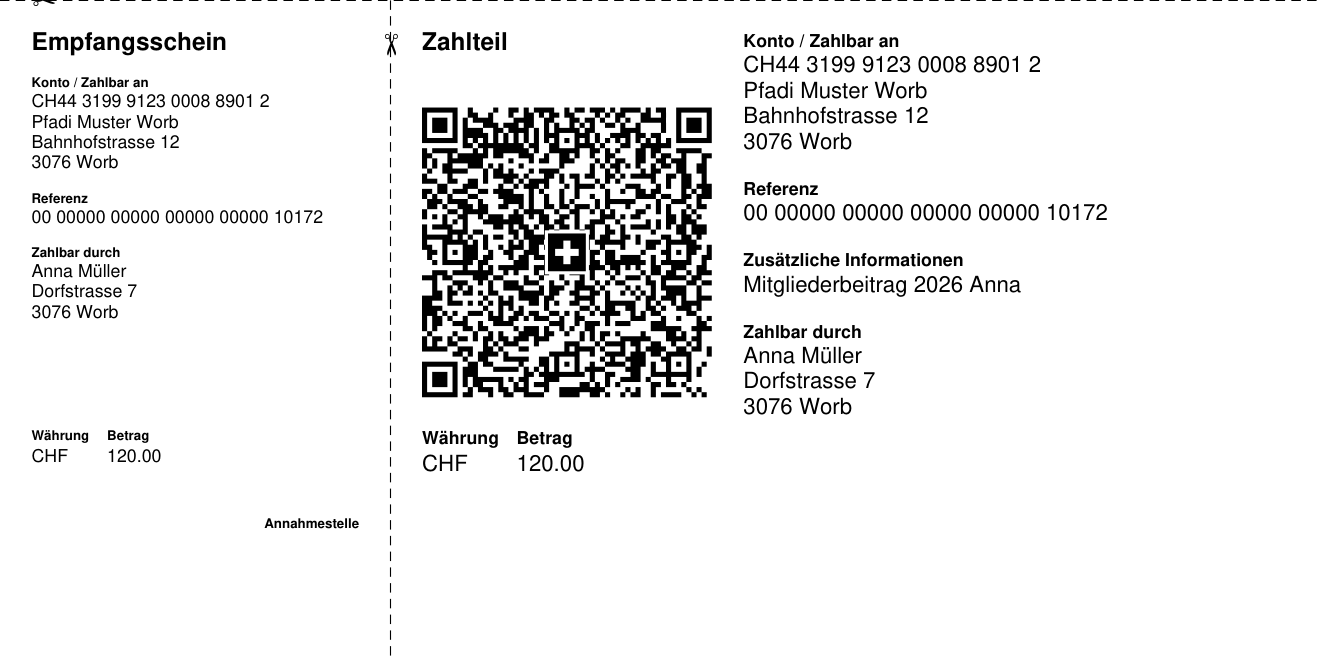
Sample payment part with receipt created with QR-Bill Batch

For everyone who keeps their billing in a spreadsheet

Clubs & associations

Annual fees for all members in one go – with a cover letter and payment part on one A4 page, ready for a window envelope.

Courses & camps

Participation fees straight from the sign-up list. With a QR reference you see at once who has paid.

Freelancers & small businesses

A few invoices a month without expensive accounting software – free for up to 10 bills.

How it works

Open your list

Your existing member or customer list is enough. Columns like “Name”, “Street”, “Postal code”, “Town”, “Amount” are detected automatically – in English, German, French or Italian.

Check the data

One click shows in a new column which rows are ready and where e.g. a postal code is missing – before anything goes out.

Create the PDFs

One PDF per row and, if you like, one combined PDF for printing. Everything goes into a new folder in your Google Drive, linked from the sheet.

Compliant with the Swiss standard

Current SIX guidelines (v2.3)

Structured addresses, extended character set, A6 payment part with receipt, Swiss cross, scissors separator lines for PDF bills.

QR-IBAN or regular IBAN

With a QR-IBAN a QR reference is created automatically from the invoice or member number. With a regular IBAN, optionally an RF reference.

Forgiving input

“Main Street 12” is split into street and number, “1'250.–” is read as an amount, typographic characters from Word are cleaned up.

Privacy built in

The PDFs are created inside Google and saved to your Drive. Names, addresses and amounts never leave your Google account.

Pricing

Free

CHF 0
  • 10 QR-bills per month
  • All features incl. letter and combined PDF
  • English, German, French, Italian

FAQ

Do I need perforated paper?

Only if your recipients pay at the post office counter. For e-banking and mobile banking the PDF or a print on plain paper is enough – the payment part then carries separator lines with a scissors symbol, as the standard requires.

What is the difference between a QR-IBAN and an IBAN?

With a QR-IBAN (available from your bank) each bill gets a QR reference and your bank reports incoming payments so they can be matched automatically. Your regular IBAN works too – with a message or an RF reference.

Does it work with Excel?

Open your Excel file in Google Sheets (File › Import) – everything works the same from there.

Who sees my data?

Nobody but you. The add-on runs in your Google account and can only access the open spreadsheet and the files it creates itself. For Pro, only your license key is checked. Details in the privacy policy.